Dear educator, parent, community member and student,


We are now extending a warm invitation to other KLA (Key Learning Areas) and subjects to accept the NEW #subjectatschool invitation. Congrats to @artatbally for accepting the invitation after hearing about the educators instagram initiative at a recent #teachmeet in Sydney.

What IS the #subjectatschool instagram invitation?
Basically, it is an opportunity for you to CREATE a school based account (not using your personal account) and leverage instagram as:
- your subjects visual literacy
- share learning with your students, parents and wider communities
- a means to enhance student engagement
- a site of virtual connection to students (notices, texts and quotes can also be uploaded)
- a great tool to teach digital etiquette
- an avenue to connect with educators and students from around the state, nation and world
- documentation of all the amazing learning activities that occur!
In order to connect more fluently, create an Instagram account
using
the #subjectatschool formula.
Eg @artatbally @foodatoakhill @mathsatgalstonhigh @PEatpacifichills @dramaatoakhill

How do I do this?
- Firstly, have a clear idea as to WHY you would like to establish an instagram account. Jot down a few ideas and spend time researching other education accounts and/or chat to other educators using Instagram. You can use Instagram as a notice board for students, posting screen shots or text using apps such as Tweegram or versagram.


- Next, it is a good idea to have a conversation with your Head of school/principal or school leadership team regarding permission to create a school based account. The account can be set to PRIVATE or public. ( I had ours on private for about 3-4 months adding only student and parent followers). Perhaps you may like to show your Head of school a few accounts and comments made by students, parents and community members. They may not be familiar with the popularity and usage of Instagram. Do parents need to be informed or has previous consent been given via signed media policies? What does the schools media policy cover?

 |
| Oakhill College students taking images of their rice paper rolls in natural light near our garden. |
- Discuss HOW you plan to use Instagram. Is a trial necessary? The first images I uploaded were all of general school scenes and aerial shots of students working or preparing food.
- If you have a school device or smart phone, download the FREE Instagram app (available on both android and ios devices). If not, use another smart phone to create an account. (At this stage you can ONLY sign up for Instagram using an app. You can however VIEW the account from a PC-handy for parents, grandma and so on at home!)
Creating an Instagram account:
- Very simple! All you need is a user name and password. (Navigate to REGISTER) Keep the handle shorter for convenience. It is also easier for others to remember! @mediaatgreystaneshighschool is a tad long! A better option is @mediaatGH or @mediaatgreystanes You can choose one person to manage the account or share the account with a few department teachers that will keep the password secure. After you create the account, you will sign in from the bottom box (See below). If you have one account, you do not need to sign out from your device, however if you have multiple accounts you must sign out and sign in. (no adding multiple accounts - AS YET! Fingers crossed!)

- Add a BIO (Edit bio) Inform others of who you are. eg The Media department at Greystanes High will post progress pics of the 2013 Rock eisteddfod. Go team Greystanes! You can link a twitter account or class blog here.
- Post your first photo by pressing the middle camera icon. (see instagram help: how do I take a photo) Select "choose" (to add photo), then a select a filter. You can add a tilt shift (blur out part of photo or select the "sun" icon to brighten and add detail. If it doesn't look right, change.
The best way to learn is to experiment. Play. It is fun!
- If you are not happy with the photo, press the X on the top RHS. Have another go. Once posted, you can also delete an image by pressing the three little dots under the image (RHS)
- Interact by following other educational accounts, liking certain photos and commenting on photos from classes around the world (see links below). As more educators/subjects join, I will add their Instagram account to the list below...
- Inform students of your subjects Instagram account. Link to a QR code and paste in diaries or post on your virtual classrooms. Include in a newsletter home or school facebook page.
- You can use hashtags such as #foodtech #homeec #homeeconomics #food #foodphotography #foodpresentation #instafood to tag your photos to these photofeeds.
- Other educational # include #artworks #artlessons #lighting #theatre #setdesign #dramaclass
Go on! Get on board. Give it a go.
Share your Instagram account with your class, mates, parents, extended family...and the rest of the world! #unitedbylearning
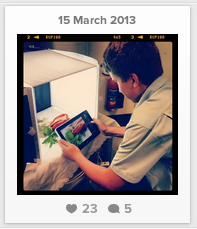
Sharing our learning with other students and parents.
Check out the other schools around the world that have accepted the #foodatschool challenge.
(Hover over school to select link)
- Very simple! All you need is a user name and password. (Navigate to REGISTER) Keep the handle shorter for convenience. It is also easier for others to remember! @mediaatgreystaneshighschool is a tad long! A better option is @mediaatGH or @mediaatgreystanes You can choose one person to manage the account or share the account with a few department teachers that will keep the password secure. After you create the account, you will sign in from the bottom box (See below). If you have one account, you do not need to sign out from your device, however if you have multiple accounts you must sign out and sign in. (no adding multiple accounts - AS YET! Fingers crossed!)

- Add a BIO (Edit bio) Inform others of who you are. eg The Media department at Greystanes High will post progress pics of the 2013 Rock eisteddfod. Go team Greystanes! You can link a twitter account or class blog here.
- Post your first photo by pressing the middle camera icon. (see instagram help: how do I take a photo) Select "choose" (to add photo), then a select a filter. You can add a tilt shift (blur out part of photo or select the "sun" icon to brighten and add detail. If it doesn't look right, change.
The best way to learn is to experiment. Play. It is fun!
- If you are not happy with the photo, press the X on the top RHS. Have another go. Once posted, you can also delete an image by pressing the three little dots under the image (RHS)
- Interact by following other educational accounts, liking certain photos and commenting on photos from classes around the world (see links below). As more educators/subjects join, I will add their Instagram account to the list below...
- Inform students of your subjects Instagram account. Link to a QR code and paste in diaries or post on your virtual classrooms. Include in a newsletter home or school facebook page.
- You can use hashtags such as #foodtech #homeec #homeeconomics #food #foodphotography #foodpresentation #instafood to tag your photos to these photofeeds.
- Other educational # include #artworks #artlessons #lighting #theatre #setdesign #dramaclass
Go on! Get on board. Give it a go.
Share your Instagram account with your class, mates, parents, extended family...and the rest of the world! #unitedbylearning
 |
| Sharing our learning with other students and parents. |
Check out the other schools around the world that have accepted the #foodatschool challenge.
(Hover over school to select link)
AUSTRALIA
Tasmania:
NSW:
Victoria:
Western Australia:
ENGLAND:
USA:
IRELAND:
Other educators in our community:
Primary schools? eg @stage3atepping, @stage2atstmonicas
NEW #subjectatschool initiative- WHO will be next to accept the invitation?
NEW #subjectatschool initiative- WHO will be next to accept the invitation?
This is a post in progress and will be adapted and edited over the upcoming weeks. Please share any tips, hints, suggestions that you feel, would benefit others pondering on how to use Instagram as a learning space. See you in the insta world!
Keeping the conversation flowing,
@foodatoakhill Twitter handle
Ps Please contribute how you use Instagram for education in the comments below.
Ps Please contribute how you use Instagram for education in the comments below.


